Beyond One-Shot AI Renders: Build a Visual Design Workflow
Why architects and interior designers need a connected visual workspace for AI renders, branches, edits, references, and client decisions.

Key takeaways
One-shot AI renders are useful for exploration, but weak for real project decision-making.
A visual workspace keeps sources, branches, edits, materials, and final images connected.
Traceable render histories help teams explain why a design direction changed and what was approved.
The problem with one-shot AI renders
A single AI render can look impressive, but design work rarely ends with one image. Architects, interior designers, landscape designers, and visualization teams need to compare options, explain tradeoffs, respond to feedback, and return to earlier directions when a client changes their mind.
That is where one-shot rendering starts to break down. A folder full of isolated outputs may contain good visuals, but it does not show the path from source image to decision. The team still has to remember which prompt created which option, which material reference mattered, and why one branch was better than another.
For professional design work, the output is only half the value. The workflow around the output is what turns AI images into usable project communication.
Every design decision should stay visually connected
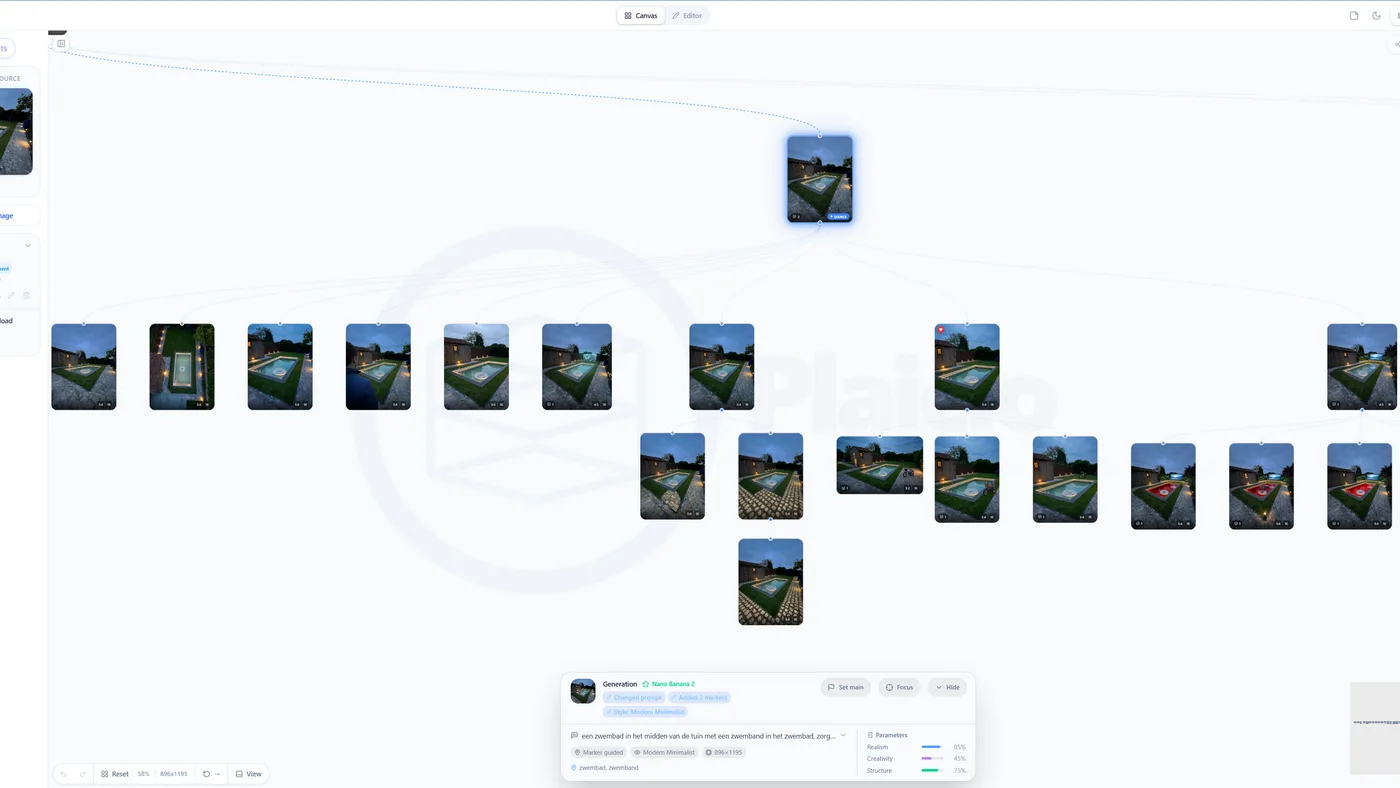
A connected visual workflow keeps the source, references, branches, edits, and final render in one place. Instead of treating each image as a separate result, the canvas becomes a decision map. You can see where the project started, which options were explored, and which direction became the next base image.
This matters because design decisions are relational. A warmer material option only makes sense compared with the cooler option. A night render only matters if the original daylight view stays visible. A furniture placement study is easier to discuss when the empty room and moodboard are still connected to the result.
When the visual history stays connected, the team can move faster without losing control. That is the difference between generating images and building a design workflow.
Start from real project inputs
A strong workflow begins with the material designers already have: a room photo, sketch, moodboard, floorplan, 3D model screenshot, product image, or previous render. These inputs give the AI model visual context and give the team a stable anchor for evaluating the result.
The source also makes the client conversation easier. If the team starts from the real room, the client understands what changed. If the team starts from a floorplan, the client can follow how the spatial logic became a styled visual. If the team starts from a moodboard, the client can see how the references informed the final direction.
The point is not to hide the source. The point is to keep it visible so the generated image feels like a continuation of the design process instead of a random alternative.
Branching makes exploration safer
AI makes it tempting to overwrite the current image with a new idea. Branching is safer. It lets a designer try a bolder style, a different time of day, a material swap, or a new furniture direction without losing the option that already worked.
This is especially valuable in client-facing work. A studio can preserve the approved direction while exploring a second branch for warmer lighting, a more minimal palette, or a stronger landscape treatment. If the new idea fails, the original path is still intact. If it succeeds, it becomes the new source for refinement.
Branching also makes critique more productive. Instead of asking which image is nicest, the team can ask what changed between branches and whether that change supports the brief.
Markers and references turn AI into direction, not guessing
Text prompts are useful, but design work is visual. Markers, masks, source images, material references, and moodboards give the AI clearer instructions about what should change and what should stay fixed. They also help the designer explain the intent behind each output.
For example, a marker can say where a product should be placed, a material reference can define the finish language, and a moodboard can set the atmosphere. When those inputs stay attached to the resulting image, the output becomes easier to evaluate and repeat.
This approach protects design control. The AI is no longer inventing the whole scene from a vague prompt. It is responding to a structured visual brief.
Traceability helps clients trust the process
Clients often react to AI renders with a mix of excitement and uncertainty. They may like the image but wonder what is real, what is conceptual, and why the design changed. A traceable workflow helps answer those questions without a long explanation.
When the canvas shows the source, the first direction, the revision branch, and the final image, the design story becomes visible. The client can see progress. They can understand that the result came from their brief, the existing space, and the designer's decisions rather than from an unpredictable image generator.
This also makes approvals more grounded. A client is not just approving a pretty image. They are approving a path: this source, this material direction, this branch, this refinement.
A better workflow reduces review chaos
Without structure, AI can create review chaos quickly. Five options become twenty. The team forgets which version had the better lighting. A client asks to combine two images that came from unrelated prompts. The visual quality goes up, but the decision quality goes down.
A visual workspace gives every output a place. Strong branches can be continued. Weak branches can be hidden without deleting the history. Material tests, atmosphere studies, floorplan transformations, and final polish can all live in the same project context.
The result is not fewer ideas. It is better organized exploration. Designers can generate freely while still keeping the project readable.
What to show on your canvas
A practical AI render canvas should show the source images, the main branches, key references, selected outputs, and final presentation candidates. It should be easy to understand which images are experiments and which ones are part of the approved path.
Use short labels that name the design decision: warmer material direction, evening mood, furniture option B, pool placement, rendered floorplan, or final polish. These labels are more useful than generic filenames because they describe why the image exists.
Over time, the canvas becomes more than a generation board. It becomes the project memory for visual decisions.
From first concept to final image
The strongest AI visualization workflows do not stop at generation. They move from first concept to branch exploration, then into focused editing, material refinement, enhancement, and final export. Each stage has a different purpose, and each stage should stay connected to the visual history.
This is why the future of AI rendering for design teams is not just better image quality. It is better control, better comparison, better memory, and better communication. The teams that get the most from AI will be the teams that turn it into a repeatable workflow instead of a folder of isolated experiments.
Go beyond one-shot AI renders. Use AI to explore, branch, edit, and track every design decision from first concept to final image.